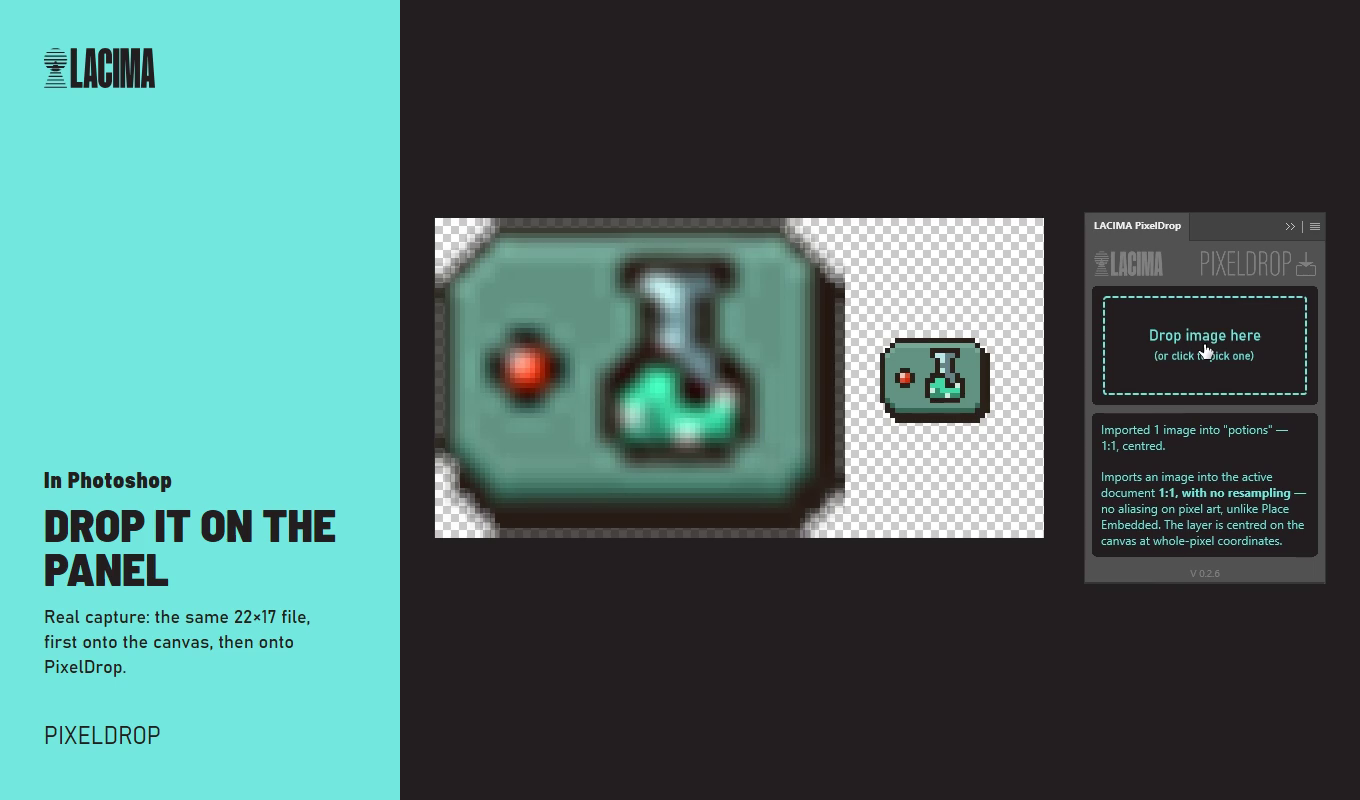
Drop a sprite on the canvas and Photoshop scales and blurs it. Drop it on PixelDrop and it lands 1:1, centred.
Download
Get it by email
Free for commercial work. The link arrives in a minute and works for 7 days.
Why
The job it does
Drag an image straight into a Photoshop document and it comes in through Place Embedded: a Smart Object, fitted to the canvas, interpolated. On pixel art that's fatal. The workaround is open, copy, paste. PixelDrop is that workaround as one gesture.
How it works
How it works
Step 1
Open your document
The one you're working in.
Step 2
Drop the image on the panel
Or click the panel to pick one or more files.
Step 3
Keep working
Each image arrives as a raster layer at its original size, centred on whole pixels. No dialog, no settings to get wrong.
Features
What's in it
- Raster layer at original size, never resampled
- Centred on whole-pixel coordinates
- Several images at once
- PNG, JPG, GIF, BMP, TIFF, WebP, PSD and PSB
- No dialog and no import settings
- Panel in 10 languages
Questions
Good to know
Is it nearest-neighbour scaling?
No. PixelDrop doesn't resample at all: it copies the pixels as they are.
Is it really free?
Yes. No key, no account, nothing to activate. Use it in commercial work.